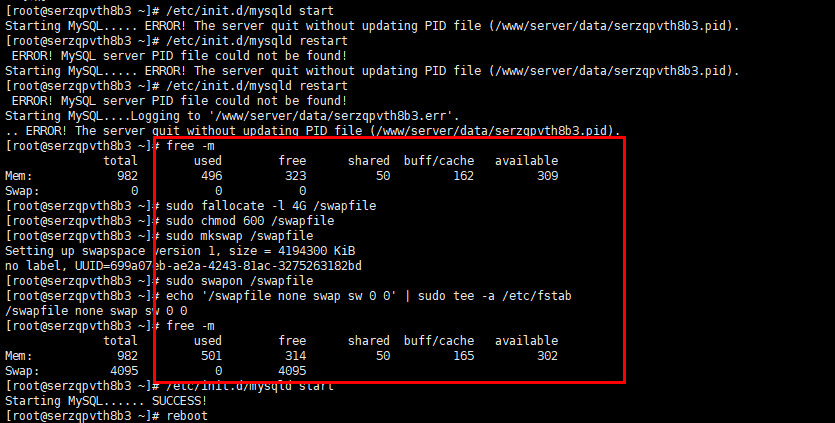
<p><span style="font-weight: 600; color: rgb(64, 64, 64); font-family: quote-cjk-patch, Inter, system-ui, -apple-system, BlinkMacSystemFont, "Segoe UI", Roboto, "Noto Sans", Ubuntu, Cantarell, "Helvetica Neue", Oxygen, "Open Sans", sans-serif; font-size: 16.002px; text-wrap-mode: wrap; background-color: rgb(255, 255, 255);">作用</span><span style="color: rgb(64, 64, 64); font-family: quote-cjk-patch, Inter, system-ui, -apple-system, BlinkMacSystemFont, "Segoe UI", Roboto, "Noto Sans", Ubuntu, Cantarell, "Helvetica Neue", Oxygen, "Open Sans", sans-serif; font-size: 16.002px; text-wrap-mode: wrap; background-color: rgb(255, 255, 255);">:当物理内存不足时,Swap 空间作为虚拟内存可防止系统崩溃,提升服务器稳定性。</span></p><pre class="brush:bash;toolbar:false"># 创建交换文件(4GB示例,根据磁盘空间调整)
sudo fallocate -l 4G /swapfile
sudo chmod 600 /swapfile
sudo mkswap /swapfile
sudo swapon /swapfile
# 永久生效
echo '/swapfile none swap sw 0 0' | sudo tee -a /etc/fstab
# 验证
free -m</pre><p><img src="https://www.80zx.com/uploadfile/ueditor/image/202507/1753180396dccb9d.png" title="1a73bb2c-888a-4c28-b09d-745d18f5c633" alt="1a73bb2c-888a-4c28-b09d-745d18f5c633"/></p><h4 style="font-size: 16.002px; line-height: 28.575px; margin: 18.288px 0px 13.716px; color: rgb(64, 64, 64); font-family: quote-cjk-patch, Inter, system-ui, -apple-system, BlinkMacSystemFont, "Segoe UI", Roboto, "Noto Sans", Ubuntu, Cantarell, "Helvetica Neue", Oxygen, "Open Sans", sans-serif; text-wrap-mode: wrap; background-color: rgb(255, 255, 255);">命令逐行解析:</h4><ol class=" list-paddingleft-2" style="list-style-type: decimal;"><li><p class="ds-markdown-paragraph" style="margin-top: 0px; margin-bottom: 4px; line-height: 28.575px;"><span style="font-weight: 600;">创建交换文件</span></p></li></ol><pre class="brush:bash;toolbar:false">sudo fallocate -l 4G /swapfile</pre><ul style="margin-top: 4px; padding-left: 27.432px; color: rgb(64, 64, 64); font-family: quote-cjk-patch, Inter, system-ui, -apple-system, BlinkMacSystemFont, "Segoe UI", Roboto, "Noto Sans", Ubuntu, Cantarell, "Helvetica Neue", Oxygen, "Open Sans", sans-serif; font-size: 16.002px; text-wrap-mode: wrap; background-color: rgb(255, 255, 255);" class=" list-paddingleft-2"><li><p class="ds-markdown-paragraph" style="margin-top: 0px; line-height: 28.575px; margin-bottom: 0px !important;"><code style="font-size: 0.875em; font-weight: 600; font-family: Menlo, "Roboto Mono", "Courier New", Courier, monospace, Inter, sans-serif; background-color: rgb(236, 236, 236); border-radius: 4px; padding: 0.15rem 0.3rem;">fallocate</code>:快速分配磁盘空间(比 <code style="font-size: 0.875em; font-weight: 600; font-family: Menlo, "Roboto Mono", "Courier New", Courier, monospace, Inter, sans-serif; background-color: rgb(236, 236, 236); border-radius: 4px; padding: 0.15rem 0.3rem;">dd</code> 更高效)</p></li><li><p class="ds-markdown-paragraph" style="margin-top: 0px; line-height: 28.575px; margin-bottom: 0px !important;"><code style="font-size: 0.875em; font-weight: 600; font-family: Menlo, "Roboto Mono", "Courier New", Courier, monospace, Inter, sans-serif; background-color: rgb(236, 236, 236); border-radius: 4px; padding: 0.15rem 0.3rem;">-l 4G</code>:创建 4GB 文件(根据需求调整,如 <code style="font-size: 0.875em; font-weight: 600; font-family: Menlo, "Roboto Mono", "Courier New", Courier, monospace, Inter, sans-serif; background-color: rgb(236, 236, 236); border-radius: 4px; padding: 0.15rem 0.3rem;">2G</code>/<code style="font-size: 0.875em; font-weight: 600; font-family: Menlo, "Roboto Mono", "Courier New", Courier, monospace, Inter, sans-serif; background-color: rgb(236, 236, 236); border-radius: 4px; padding: 0.15rem 0.3rem;">8G</code>)</p></li></ul><p class="ds-markdown-paragraph" style="margin-top: 0px; margin-bottom: 4px; line-height: 28.575px;"><span style="font-weight: 600; font-size: 16px;">2.设置安全权限</span></p><pre class="brush:bash;toolbar:false">sudo chmod 600 /swapfile</pre><ol style="margin-top: 13.716px; margin-bottom: 13.716px; padding-left: 27.432px; color: rgb(64, 64, 64); font-family: quote-cjk-patch, Inter, system-ui, -apple-system, BlinkMacSystemFont, "Segoe UI", Roboto, "Noto Sans", Ubuntu, Cantarell, "Helvetica Neue", Oxygen, "Open Sans", sans-serif; font-size: 16.002px; text-wrap-mode: wrap; background-color: rgb(255, 255, 255);" class=" list-paddingleft-2"><ul style="margin-top: 4px; padding-left: 27.432px;" class=" list-paddingleft-2"><li><p class="ds-markdown-paragraph" style="margin-top: 0px; line-height: 28.575px; margin-bottom: 0px !important;">限制为 <code style="font-size: 0.875em; font-weight: 600; font-family: Menlo, "Roboto Mono", "Courier New", Courier, monospace, Inter, sans-serif; background-color: rgb(236, 236, 236); border-radius: 4px; padding: 0.15rem 0.3rem;">root</code> 可读写,防止普通用户篡改,提升安全性</p></li></ul></ol><p class="ds-markdown-paragraph" style="margin-top: 0px; margin-bottom: 4px; line-height: 28.575px;"><span style="font-weight: 600; font-size: 16px;">3.格式化交换文件</span></p><pre class="brush:bash;toolbar:false">sudo mkswap /swapfile</pre><p class="ds-markdown-paragraph" style="margin-top: 0px; line-height: 28.575px; margin-bottom: 0px !important;">写入特殊签名,使文件被识别为交换空间</p><p class="ds-markdown-paragraph" style="margin-top: 0px; margin-bottom: 4px; line-height: 28.575px;"><span style="font-weight: 600; font-size: 16px;">4.立即启用交换空间</span></p><pre class="brush:bash;toolbar:false">sudo swapon /swapfile</pre><ol style="margin-top: 13.716px; margin-bottom: 13.716px; padding-left: 27.432px; color: rgb(64, 64, 64); font-family: quote-cjk-patch, Inter, system-ui, -apple-system, BlinkMacSystemFont, "Segoe UI", Roboto, "Noto Sans", Ubuntu, Cantarell, "Helvetica Neue", Oxygen, "Open Sans", sans-serif; font-size: 16.002px; text-wrap-mode: wrap; background-color: rgb(255, 255, 255);" class=" list-paddingleft-2"><ul style="margin-top: 4px; padding-left: 27.432px;" class=" list-paddingleft-2"><li><p class="ds-markdown-paragraph" style="margin-top: 0px; line-height: 28.575px; margin-bottom: 0px !important;">激活交换文件,无需重启即可生效</p></li></ul></ol><p class="ds-markdown-paragraph" style="margin-top: 0px; margin-bottom: 4px; line-height: 28.575px;"><span style="font-weight: 600; font-size: 16px;">5.永久生效(开机自动挂载)</span></p><pre class="brush:bash;toolbar:false">echo '/swapfile none swap sw 0 0' | sudo tee -a /etc/fstab</pre><p class="ds-markdown-paragraph" style="margin-top: 13.716px; margin-bottom: 13.716px; font-size: 16.002px; line-height: 28.575px; color: rgb(64, 64, 64); font-family: quote-cjk-patch, Inter, system-ui, -apple-system, BlinkMacSystemFont, "Segoe UI", Roboto, "Noto Sans", Ubuntu, Cantarell, "Helvetica Neue", Oxygen, "Open Sans", sans-serif; text-wrap-mode: wrap; background-color: rgb(255, 255, 255);">各字段含义:</p><ol style="margin-top: 13.716px; margin-bottom: 13.716px; padding-left: 27.432px; color: rgb(64, 64, 64); font-family: quote-cjk-patch, Inter, system-ui, -apple-system, BlinkMacSystemFont, "Segoe UI", Roboto, "Noto Sans", Ubuntu, Cantarell, "Helvetica Neue", Oxygen, "Open Sans", sans-serif; font-size: 16.002px; text-wrap-mode: wrap; background-color: rgb(255, 255, 255);" class=" list-paddingleft-2"><li><p class="ds-markdown-paragraph" style="margin-top: 0px; line-height: 28.575px; margin-bottom: 0px !important;"><span style="font-weight: 600;"><code style="font-size: 0.875em; font-family: Menlo, "Roboto Mono", "Courier New", Courier, monospace, Inter, sans-serif; background-color: rgb(236, 236, 236); border-radius: 4px; padding: 0.15rem 0.3rem;">/swapfile</code></span><br/>交换文件的路径(设备名)</p></li><li><p class="ds-markdown-paragraph" style="margin-top: 0px; margin-bottom: 4px; line-height: 28.575px;"><span style="font-weight: 600;"><code style="font-size: 0.875em; font-family: Menlo, "Roboto Mono", "Courier New", Courier, monospace, Inter, sans-serif; background-color: rgb(236, 236, 236); border-radius: 4px; padding: 0.15rem 0.3rem;">none</code></span><br/><span style="font-weight: 600;">表示没有传统意义上的挂载点</span>(如 <code style="font-size: 0.875em; font-weight: 600; font-family: Menlo, "Roboto Mono", "Courier New", Courier, monospace, Inter, sans-serif; background-color: rgb(236, 236, 236); border-radius: 4px; padding: 0.15rem 0.3rem;">/mnt/swap</code>)。因为:</p></li><ul style="margin-top: 4px; padding-left: 27.432px;" class=" list-paddingleft-2"><li><p class="ds-markdown-paragraph" style="margin-top: 0px; line-height: 28.575px; margin-bottom: 0px !important;">Swap 空间是作为<span style="font-weight: 600;">虚拟内存</span>使用,不是磁盘文件系统</p></li><li><p class="ds-markdown-paragraph" style="margin-top: 0px; line-height: 28.575px; margin-bottom: 0px !important;">不需要像普通磁盘分区那样挂载到目录树中</p></li><li><p class="ds-markdown-paragraph" style="margin-top: 0px; line-height: 28.575px; margin-bottom: 0px !important;">这是 swap 类型条目在 fstab 中的标准写法</p></li></ul><li><p class="ds-markdown-paragraph" style="margin-top: 0px; line-height: 28.575px; margin-bottom: 0px !important;"><span style="font-weight: 600;"><code style="font-size: 0.875em; font-family: Menlo, "Roboto Mono", "Courier New", Courier, monospace, Inter, sans-serif; background-color: rgb(236, 236, 236); border-radius: 4px; padding: 0.15rem 0.3rem;">swap</code></span><br/>明确指定文件系统类型为交换空间</p></li><li><p class="ds-markdown-paragraph" style="margin-top: 0px; margin-bottom: 4px; line-height: 28.575px;"><span style="font-weight: 600;"><code style="font-size: 0.875em; font-family: Menlo, "Roboto Mono", "Courier New", Courier, monospace, Inter, sans-serif; background-color: rgb(236, 236, 236); border-radius: 4px; padding: 0.15rem 0.3rem;">sw</code></span><br/>挂载选项(mount options):</p></li><ul style="margin-top: 4px; padding-left: 27.432px;" class=" list-paddingleft-2"><li><p class="ds-markdown-paragraph" style="margin-top: 0px; line-height: 28.575px; margin-bottom: 0px !important;"><code style="font-size: 0.875em; font-weight: 600; font-family: Menlo, "Roboto Mono", "Courier New", Courier, monospace, Inter, sans-serif; background-color: rgb(236, 236, 236); border-radius: 4px; padding: 0.15rem 0.3rem;">sw</code> = 启用读写(swap read/write)</p></li><li><p class="ds-markdown-paragraph" style="margin-top: 0px; line-height: 28.575px; margin-bottom: 0px !important;">等效写法:<code style="font-size: 0.875em; font-weight: 600; font-family: Menlo, "Roboto Mono", "Courier New", Courier, monospace, Inter, sans-serif; background-color: rgb(236, 236, 236); border-radius: 4px; padding: 0.15rem 0.3rem;">defaults</code> 或 <code style="font-size: 0.875em; font-weight: 600; font-family: Menlo, "Roboto Mono", "Courier New", Courier, monospace, Inter, sans-serif; background-color: rgb(236, 236, 236); border-radius: 4px; padding: 0.15rem 0.3rem;">sw 0 0</code></p></li></ul><li><p class="ds-markdown-paragraph" style="margin-top: 0px; margin-bottom: 4px; line-height: 28.575px;"><span style="font-weight: 600;"><code style="font-size: 0.875em; font-family: Menlo, "Roboto Mono", "Courier New", Courier, monospace, Inter, sans-serif; background-color: rgb(236, 236, 236); border-radius: 4px; padding: 0.15rem 0.3rem;">0 0</code></span></p></li><ul style="margin-top: 4px; padding-left: 27.432px;" class=" list-paddingleft-2"><li><p class="ds-markdown-paragraph" style="margin-top: 0px; line-height: 28.575px; margin-bottom: 0px !important;">第一个 <code style="font-size: 0.875em; font-weight: 600; font-family: Menlo, "Roboto Mono", "Courier New", Courier, monospace, Inter, sans-serif; background-color: rgb(236, 236, 236); border-radius: 4px; padding: 0.15rem 0.3rem;">0</code>:<code style="font-size: 0.875em; font-weight: 600; font-family: Menlo, "Roboto Mono", "Courier New", Courier, monospace, Inter, sans-serif; background-color: rgb(236, 236, 236); border-radius: 4px; padding: 0.15rem 0.3rem;">dump</code> 工具不备份此"文件系统"</p></li><li><p class="ds-markdown-paragraph" style="margin-top: 0px; line-height: 28.575px; margin-bottom: 0px !important;">第二个 <code style="font-size: 0.875em; font-weight: 600; font-family: Menlo, "Roboto Mono", "Courier New", Courier, monospace, Inter, sans-serif; background-color: rgb(236, 236, 236); border-radius: 4px; padding: 0.15rem 0.3rem;">0</code>:启动时 <code style="font-size: 0.875em; font-weight: 600; font-family: Menlo, "Roboto Mono", "Courier New", Courier, monospace, Inter, sans-serif; background-color: rgb(236, 236, 236); border-radius: 4px; padding: 0.15rem 0.3rem;">fsck</code> 不检查此空间</p></li></ul></ol><p class="ds-markdown-paragraph" style="margin-top: 0px; margin-bottom: 4px; line-height: 28.575px;"><span style="font-weight: 600; font-size: 16px;">6.验证Swap状态</span></p><pre class="brush:bash;toolbar:false">free -m</pre><p class="ds-markdown-paragraph" style="margin-top: 0px; margin-bottom: 4px; line-height: 28.575px;"><span style="font-weight: 600; font-size: 16px;">Swap 大小建议</span></p><ol style="margin-top: 13.716px; margin-bottom: 13.716px; padding-left: 27.432px; color: rgb(64, 64, 64); font-family: quote-cjk-patch, Inter, system-ui, -apple-system, BlinkMacSystemFont, "Segoe UI", Roboto, "Noto Sans", Ubuntu, Cantarell, "Helvetica Neue", Oxygen, "Open Sans", sans-serif; font-size: 16.002px; text-wrap-mode: wrap; background-color: rgb(255, 255, 255);" class=" list-paddingleft-2"><ul style="margin-top: 4px; padding-left: 27.432px;" class=" list-paddingleft-2"><li><p class="ds-markdown-paragraph" style="margin-top: 0px; line-height: 28.575px; margin-bottom: 0px !important;">内存 < 2GB:Swap = 内存的 2 倍</p></li><li><p class="ds-markdown-paragraph" style="margin-top: 0px; line-height: 28.575px; margin-bottom: 0px !important;">内存 2~8GB:Swap = 等于内存</p></li><li><p class="ds-markdown-paragraph" style="margin-top: 0px; line-height: 28.575px; margin-bottom: 0px !important;">内存 > 8GB:Swap ≥ 4GB(如运行数据库/内存密集型应用)</p></li></ul></ol><p class="ds-markdown-paragraph" style="margin-top: 0px; margin-bottom: 4px; line-height: 28.575px;"><span style="font-weight: 600; font-size: 16px;"></span><span style="font-weight: 600; color: rgb(64, 64, 64); font-family: quote-cjk-patch, Inter, system-ui, -apple-system, BlinkMacSystemFont, "Segoe UI", Roboto, "Noto Sans", Ubuntu, Cantarell, "Helvetica Neue", Oxygen, "Open Sans", sans-serif; font-size: 16.002px; text-wrap-mode: wrap; background-color: rgb(255, 255, 255);">删除 Swap 文件</span></p><pre class="brush:bash;toolbar:false">sudo swapoff /swapfile # 停用
sudo rm /swapfile # 删除
sudo nano /etc/fstab # 移除对应行</pre><p><br/></p>
在Linux系统中挂载新硬盘需要经过以下步骤:1. 识别新硬盘sudo fdisk -l或使用 lsblk 查看新硬盘设备名(如/dev/sdb、/dev/nvme0n1 等)。2. 分区(可选)如果硬盘未分区或需重新分区:sudo fdisk /dev/sdX # 替换 sdX 为您的硬盘设备名输入 n 创建新分区选择分区类型(默认主分区)设置分区大小(默认全盘)输入 w