安装fileinfo扩展提示内存不足的解决方法

      发布在:后端技术      评论:0 条评论
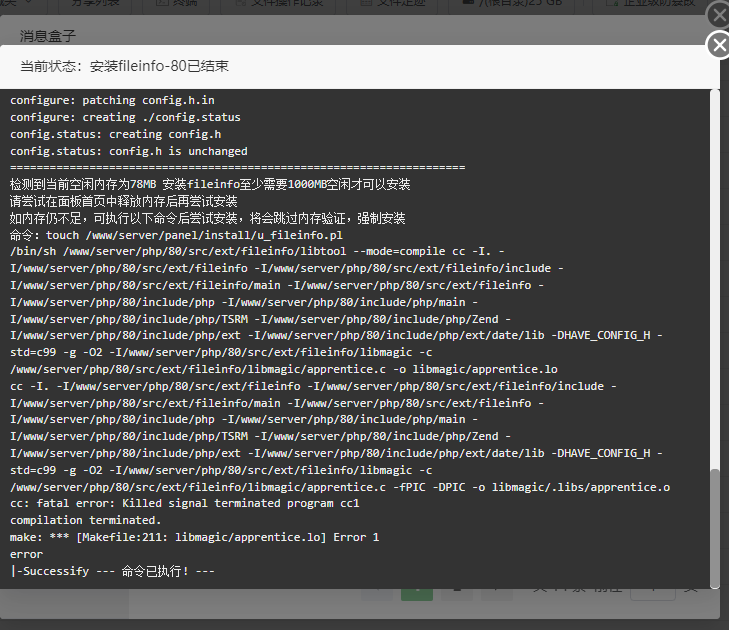
<p><img src="https://www.80zx.com/uploadfile/ueditor/image/202504/1745152978c6e669.png" title="image" alt="image"/></p><p>内存不足我们可以增加虚拟内存解决</p><pre class="brush:bash;toolbar:false">#&nbsp;创建2GB交换文件(根据实际情况可调整大小) sudo&nbsp;fallocate&nbsp;-l&nbsp;2G&nbsp;/swapfile sudo&nbsp;chmod&nbsp;600&nbsp;/swapfile sudo&nbsp;mkswap&nbsp;/swapfile sudo&nbsp;swapon&nbsp;/swapfile #&nbsp;永久生效 echo&nbsp;&#39;/swapfile&nbsp;none&nbsp;swap&nbsp;sw&nbsp;0&nbsp;0&#39;&nbsp;|&nbsp;sudo&nbsp;tee&nbsp;-a&nbsp;/etc/fstab</pre><p>另外如果是<span style="color: rgb(51, 51, 51); font-family: &quot;pingfang SC&quot;, &quot;helvetica neue&quot;, arial, &quot;hiragino sans gb&quot;, &quot;microsoft yahei ui&quot;, &quot;microsoft yahei&quot;, simsun, sans-serif; white-space: pre-wrap; background-color: rgb(255, 255, 255);">宝塔面板用户可以使用宝塔LINUX</span><span style="color: rgb(51, 51, 51); font-family: &quot;pingfang SC&quot;, &quot;helvetica neue&quot;, arial, &quot;hiragino sans gb&quot;, &quot;microsoft yahei ui&quot;, &quot;microsoft yahei&quot;, simsun, sans-serif; white-space: pre-wrap; background-color: rgb(255, 255, 255);">工具箱(宝塔面板软件商店中可以找到)中的Swap/虚拟内存,设置下虚拟内存之后重启服务器再安装就可以</span></p><p><span style="color: rgb(51, 51, 51); font-family: &quot;pingfang SC&quot;, &quot;helvetica neue&quot;, arial, &quot;hiragino sans gb&quot;, &quot;microsoft yahei ui&quot;, &quot;microsoft yahei&quot;, simsun, sans-serif; white-space: pre-wrap; background-color: rgb(255, 255, 255);"><img src="https://www.80zx.com/uploadfile/ueditor/image/202504/1745153153925fad.png" title="4a8edda8-6858-46c5-82b1-2bf0bbe34d5d" alt="4a8edda8-6858-46c5-82b1-2bf0bbe34d5d"/></span></p>
相关文章
热门推荐