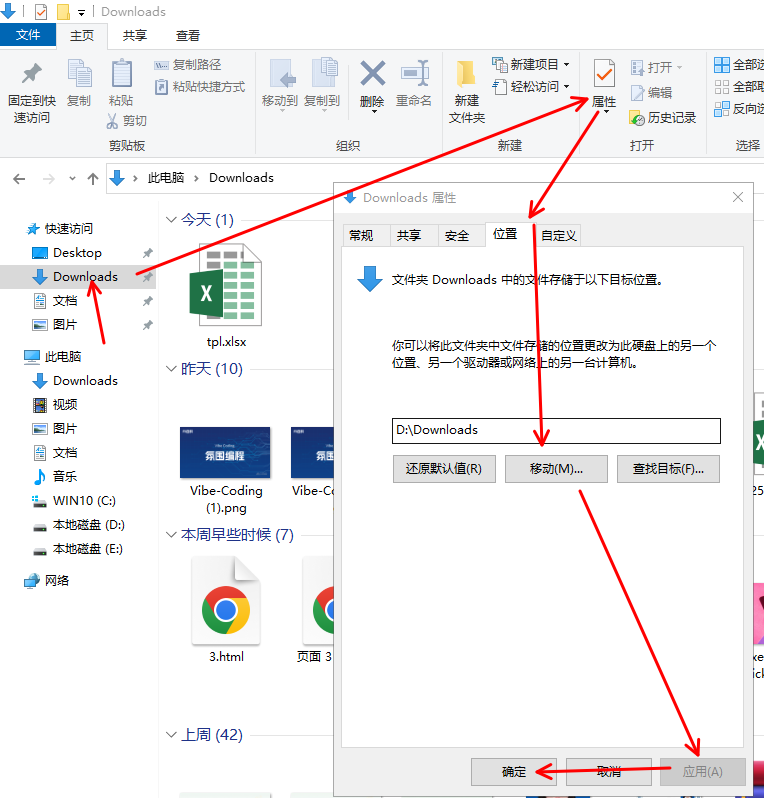
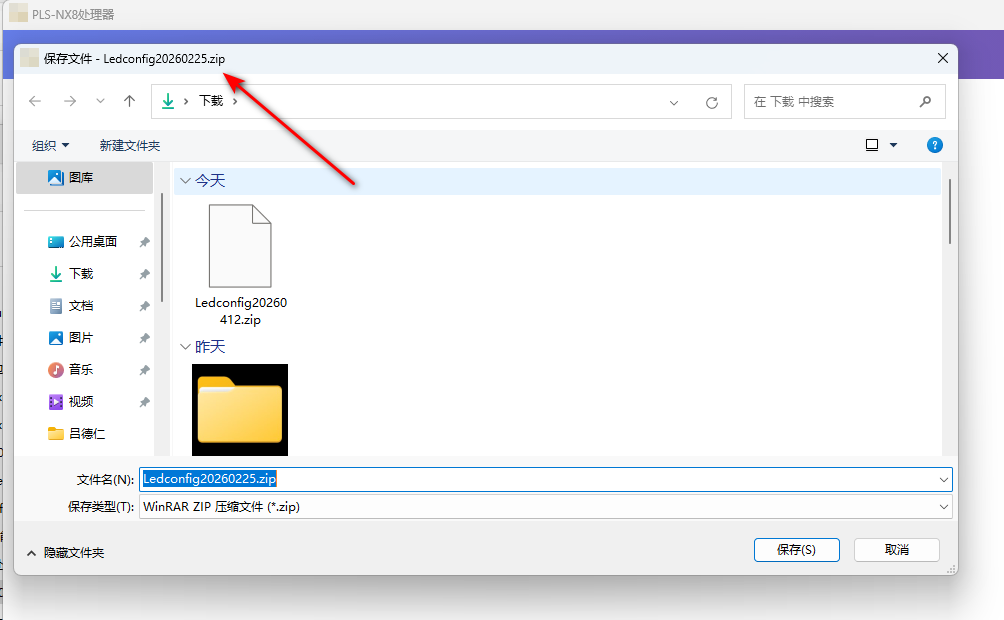
<ol style="margin-top: 13.716px; margin-bottom: 13.716px; padding-left: 27.432px; color: rgb(64, 64, 64); font-family: DeepSeek-CJK-patch, Inter, system-ui, -apple-system, BlinkMacSystemFont, "Segoe UI", Roboto, "Noto Sans", Ubuntu, Cantarell, "Helvetica Neue", Oxygen, "Open Sans", sans-serif; font-size: 16.002px; text-wrap-mode: wrap;" class=" list-paddingleft-2"><li><p style="margin-top: 0px; font-size: 16.002px; line-height: 28.575px; margin-bottom: 0px !important;"><strong>打开文件资源管理器</strong><br/>右键点击任务栏中的文件夹图标,或按 <code style="font-size: 0.875em; font-weight: 600; font-family: Menlo, "Roboto Mono", "Courier New", Courier, monospace, Inter, sans-serif; background-color: rgb(236, 236, 236); border-radius: 4px; padding: 0.15rem 0.3rem;">Win + E</code> 打开。</p></li><li><p style="margin-top: 0px; font-size: 16.002px; line-height: 28.575px; margin-bottom: 0px !important;"><strong>找到当前下载文件夹</strong><br/>进入 <code style="font-size: 0.875em; font-weight: 600; font-family: Menlo, "Roboto Mono", "Courier New", Courier, monospace, Inter, sans-serif; background-color: rgb(236, 236, 236); border-radius: 4px; padding: 0.15rem 0.3rem;">此电脑</code> → 左侧导航栏中的 <span style="color: rgb(38, 38, 38); font-family: DeepSeek-CJK-patch, Inter, system-ui, -apple-system, BlinkMacSystemFont, "Segoe UI", Roboto, "Noto Sans", Ubuntu, Cantarell, "Helvetica Neue", Oxygen, "Open Sans", sans-serif; font-size: 16px; white-space: pre-wrap; background-color: rgb(239, 246, 255);">Downloads</span>(默认路径为 <code style="font-size: 0.875em; font-weight: 600; font-family: Menlo, "Roboto Mono", "Courier New", Courier, monospace, Inter, sans-serif; background-color: rgb(236, 236, 236); border-radius: 4px; padding: 0.15rem 0.3rem;">C:\Users\用户名\Downloads</code>)。</p></li><li><p style="margin-top: 0px; margin-bottom: 4px; font-size: 16.002px; line-height: 28.575px;"><strong>修改下载文件夹位置</strong></p></li><ul style="margin-top: 4px; padding-left: 27.432px;" class=" list-paddingleft-2"><li><p style="margin-top: 0px; font-size: 16.002px; line-height: 28.575px; margin-bottom: 0px !important;">右键点击 <code style="font-size: 0.875em; font-weight: 600; font-family: Menlo, "Roboto Mono", "Courier New", Courier, monospace, Inter, sans-serif; background-color: rgb(236, 236, 236); border-radius: 4px; padding: 0.15rem 0.3rem;">下载</code> → 选择 <strong>属性</strong>。</p></li><li><p style="margin-top: 0px; font-size: 16.002px; line-height: 28.575px; margin-bottom: 0px !important;">切换到 <strong>位置</strong> 选项卡。</p></li><li><p style="margin-top: 0px; font-size: 16.002px; line-height: 28.575px; margin-bottom: 0px !important;">输入新的目标路径(如 <code style="font-size: 0.875em; font-weight: 600; font-family: Menlo, "Roboto Mono", "Courier New", Courier, monospace, Inter, sans-serif; background-color: rgb(236, 236, 236); border-radius: 4px; padding: 0.15rem 0.3rem;">D:\MyDownloads</code>),或点击 <strong>移动</strong> 选择现有文件夹。</p></li><li><p style="margin-top: 0px; font-size: 16.002px; line-height: 28.575px; margin-bottom: 0px !important;">点击 <strong>应用</strong> → 确认移动文件到新位置。</p></li></ul><li><p style="margin-top: 0px; font-size: 16.002px; line-height: 28.575px; margin-bottom: 0px !important;"><strong>完成修改</strong><br/>系统会提示是否将文件迁移到新位置,选择 <strong>是</strong>。重启文件资源管理器后生效。</p></li></ol><p><img src="http://www.80zx.com/uploadfile/ueditor/image/202504/1744174051ebb8ba.png" title="25d924a5-e95f-430e-8586-77629dcf901e" alt="25d924a5-e95f-430e-8586-77629dcf901e"/></p>
相关文章