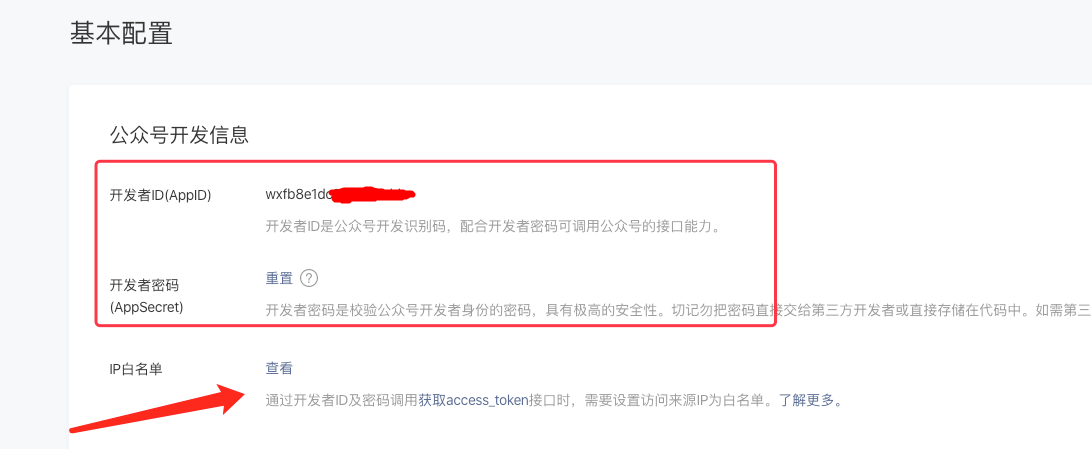
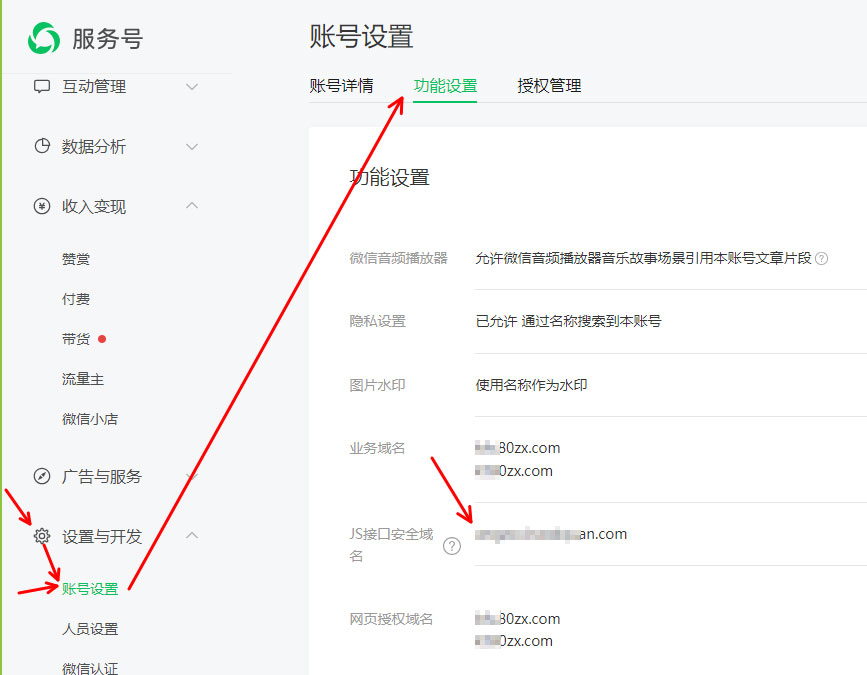
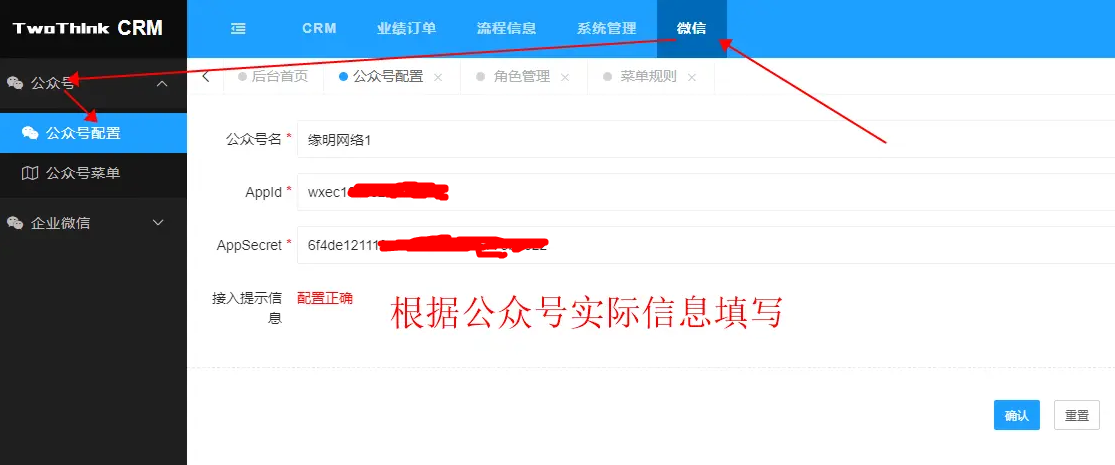
<p style="box-sizing: inherit; -webkit-tap-highlight-color: transparent; text-size-adjust: none; -webkit-font-smoothing: antialiased; margin-top: 0px; margin-bottom: 0px; line-height: 2; padding: 0px; color: rgb(82, 82, 82); font-family: "Helvetica Neue", NotoSansHans-Regular, AvenirNext-Regular, arial, "Hiragino Sans GB", "Microsoft Yahei", "WenQuanYi Micro Hei", serif; font-size: 15px; text-wrap: wrap; background-color: rgb(255, 255, 255);">#微信公众号接入配置<br/>1、登录微信公众号平台</p><p style="box-sizing: inherit; -webkit-tap-highlight-color: transparent; text-size-adjust: none; -webkit-font-smoothing: antialiased; margin-top: 0px; margin-bottom: 0px; line-height: 2; padding: 0px; color: rgb(82, 82, 82); font-family: "Helvetica Neue", NotoSansHans-Regular, AvenirNext-Regular, arial, "Hiragino Sans GB", "Microsoft Yahei", "WenQuanYi Micro Hei", serif; font-size: 15px; text-wrap: wrap; background-color: rgb(255, 255, 255);"><a href="https://mp.weixin.qq.com/" target="_blank" style="box-sizing: inherit; -webkit-tap-highlight-color: transparent; text-size-adjust: none; -webkit-font-smoothing: antialiased; background-color: transparent; color: rgb(65, 131, 196); text-decoration-line: none;">https://mp.weixin.qq.com</a></p><p style="box-sizing: inherit; -webkit-tap-highlight-color: transparent; text-size-adjust: none; -webkit-font-smoothing: antialiased; margin-top: 0px; margin-bottom: 0px; line-height: 2; padding: 0px; color: rgb(82, 82, 82); font-family: "Helvetica Neue", NotoSansHans-Regular, AvenirNext-Regular, arial, "Hiragino Sans GB", "Microsoft Yahei", "WenQuanYi Micro Hei", serif; font-size: 15px; text-wrap: wrap; background-color: rgb(255, 255, 255);">申请已认证的服务号</p><p style="box-sizing: inherit; -webkit-tap-highlight-color: transparent; text-size-adjust: none; -webkit-font-smoothing: antialiased; margin-top: 0px; margin-bottom: 0px; line-height: 2; padding: 0px; color: rgb(82, 82, 82); font-family: "Helvetica Neue", NotoSansHans-Regular, AvenirNext-Regular, arial, "Hiragino Sans GB", "Microsoft Yahei", "WenQuanYi Micro Hei", serif; font-size: 15px; text-wrap: wrap; background-color: rgb(255, 255, 255);">2、在设置与开发-开发与接口管理-基本设置中,找到以下参数<br/><img src="https://img.kancloud.cn/b0/67/b067342eda57d1f651ab76a29bcc24e5_1092x449.png" alt="" style="box-sizing: inherit; -webkit-tap-highlight-color: transparent; text-size-adjust: none; -webkit-font-smoothing: antialiased; border-style: none; max-width: 100%; display: inline-block; padding: 3px; vertical-align: middle;"/><br/>并设置服务器的ip到白名单中</p><p style="box-sizing: inherit; -webkit-tap-highlight-color: transparent; text-size-adjust: none; -webkit-font-smoothing: antialiased; margin-top: 0px; margin-bottom: 0px; line-height: 2; padding: 0px; color: rgb(82, 82, 82); font-family: "Helvetica Neue", NotoSansHans-Regular, AvenirNext-Regular, arial, "Hiragino Sans GB", "Microsoft Yahei", "WenQuanYi Micro Hei", serif; font-size: 15px; text-wrap: wrap; background-color: rgb(255, 255, 255);">3、登录CRM客户关系管理后台,找到微信》公众号》公众号配置填写微信公众号实际公众号名、Appid和AppSecret配置信息并保存。<br/><img src="https://img.kancloud.cn/28/3b/283b271cc48dabc77ef5c7dd0d01ded1_1115x465.png" alt="" style="box-sizing: inherit; -webkit-tap-highlight-color: transparent; text-size-adjust: none; -webkit-font-smoothing: antialiased; border-style: none; max-width: 100%; display: inline-block; padding: 3px; vertical-align: middle;"/><br/>4、如果需要用到微信的JS功能比如网页调用微信扫码必须设置JS接口安全域名<br/><img src="https://img.kancloud.cn/25/67/25676b8cb1a612b6860903f4e817b256_867x675.jpg" alt="" style="box-sizing: inherit; -webkit-tap-highlight-color: transparent; text-size-adjust: none; -webkit-font-smoothing: antialiased; border-style: none; max-width: 100%; display: inline-block; padding: 3px; vertical-align: middle;"/></p><p><br/></p>
相关文章